Daily Linux Commands for DevOps (2026)
? Daily Linux Commands Every DevOps Engineer Must Practice (With Real Use Cases)
Linux is the backbone of DevOps.
From servers and containers to cloud instances and CI/CD agents, Linux runs everything behind the scenes.
That’s why mastering daily Linux commands for DevOps is not optional — it’s essential.
Many beginners read Linux theory but never practice commands regularly. This article fixes that by giving you daily Linux commands every DevOps engineer must practice, along with real production use cases.
Why Daily Linux Practice Is Important for DevOps
In real DevOps roles, Linux is used for:
- Debugging production issues
- Checking logs and services
- Managing servers and containers
- Investigating performance problems
Without daily Linux practice, DevOps engineers struggle during:
- Production incidents
- On-call support
- Technical interviews
That’s why daily Linux commands for DevOps should become a habit.
Core Linux Commands Every DevOps Engineer Uses Daily
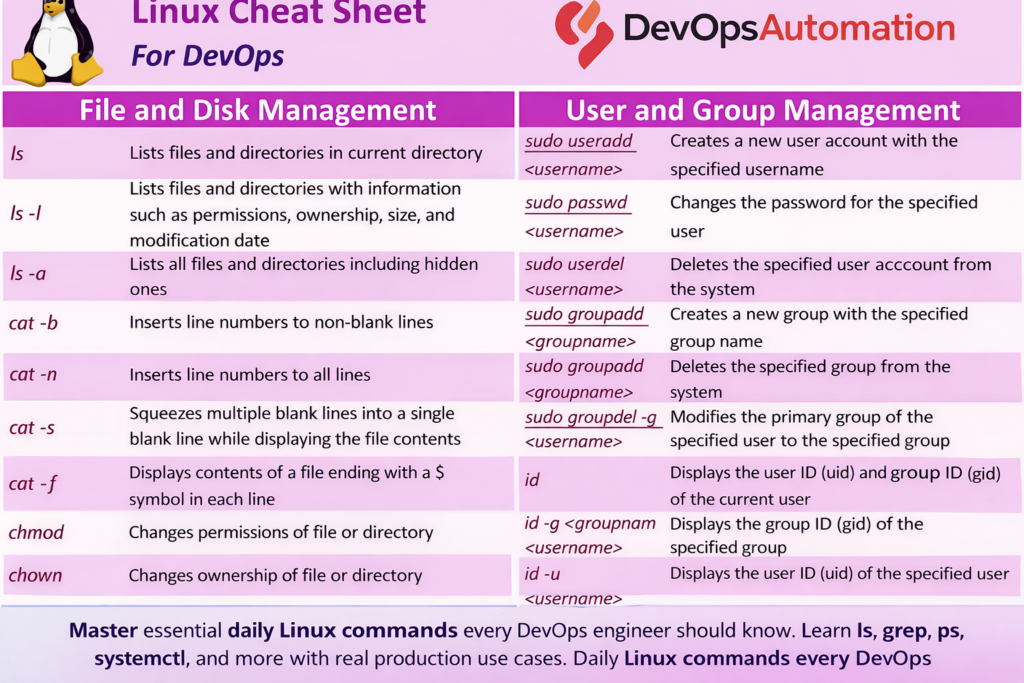
Linux Cheat Sheet for DevOps

? 1. ls – Listing Files and Directories
The ls command helps you understand directory structure quickly.
Common usage:
ls -l
ls -a
ls -lh
Real DevOps use case:
Checking configuration files, deployment folders, or build artifacts on servers.
? 2. cd – Navigating the File System
DevOps engineers constantly move between directories.
cd /var/log
cd /etc/nginx
cd ~/applications
Use case:
Accessing logs, configs, or application directories during troubleshooting.
? 3. pwd – Know Where You Are
pwd
Simple but critical when working on production servers.
Use case:
Avoid accidental changes in the wrong directory (very common production mistake).
? 4. cat, less, tail – Reading Files and Logs
cat config.yaml
less application.log
tail -f /var/log/syslog
Real DevOps use case:
Monitoring application logs during deployments or incidents.
? 5. grep – Searching Logs Like a Pro
grep "ERROR" application.log
grep -i "failed" *.log
Use case:
Finding errors in huge log files during production issues.
This is one of the most important daily Linux commands for DevOps.
? 6. ps and top – Checking Running Processes
ps aux
top
Use case:
Identifying high CPU or memory usage processes during outages.
? 7. df and du – Disk Usage Monitoring
df -h
du -sh /var/log/*
Use case:
Detecting disk-full issues — one of the most common production failures.
? 8. chmod and chown – Permissions Management
chmod 755 deploy.sh
chown nginx:nginx app/
Use case:
Fixing permission issues after deployments or file changes.
? 9. systemctl – Managing Services
systemctl status nginx
systemctl restart docker
Use case:
Restarting services after configuration changes or failures.
? 10. curl and wget – Testing Connectivity
curl http://localhost:8080
wget https://example.com/file.zip
Use case:
Testing application endpoints, health checks, and network connectivity.
How DevOps Engineers Practice Linux Daily (Realistic Approach)
Instead of random commands, follow this routine:
- Read logs using
tailandgrep - Check disk usage with
df - Monitor processes with
top - Navigate configs using
cdandls - Restart services using
systemctl
This daily Linux practice prepares you for real production environments, not just interviews.
Common Linux Mistakes Beginners Make
? Memorizing commands without practice
? Fear of breaking the system
? Ignoring permissions
? Not understanding logs
Avoid these and Linux becomes your strength.
How This Fits Into the DevOps Roadmap 2026
Daily Linux commands for DevOps directly support:
- Phase 2 – Linux & Networking Basics
- Phase 4 – CI/CD Automation
- Phase 7 – Monitoring & Observability
- Phase 8 – Production Support
Linux is used in every DevOps phase.
? How DevOps Engineers Use This Linux Cheat Sheet Daily
In real production environments, DevOps engineers use this Linux Cheat Sheet for DevOps on a daily basis while managing servers, debugging issues, and automating tasks.
Whether you are:
- Checking disk usage on cloud servers
- Managing users and permissions
- Investigating application logs
- Fixing deployment failures
These Linux commands help you respond quickly and confidently.
Mastering this Linux Cheat Sheet for DevOps reduces dependency on memorization and improves real-world efficiency. Over time, these commands become second nature and form the foundation for advanced DevOps tools like Docker, Kubernetes, and CI/CD pipelines.
What to Do Next
? Practice 5 commands daily
? Use a local VM or cloud free tier
? Break things safely and fix them
Linux confidence comes from repetition.
Further Learning
