Linux Processes & Signals for DevOps 2026 (ps, top, kill) – Production-Ready Guide
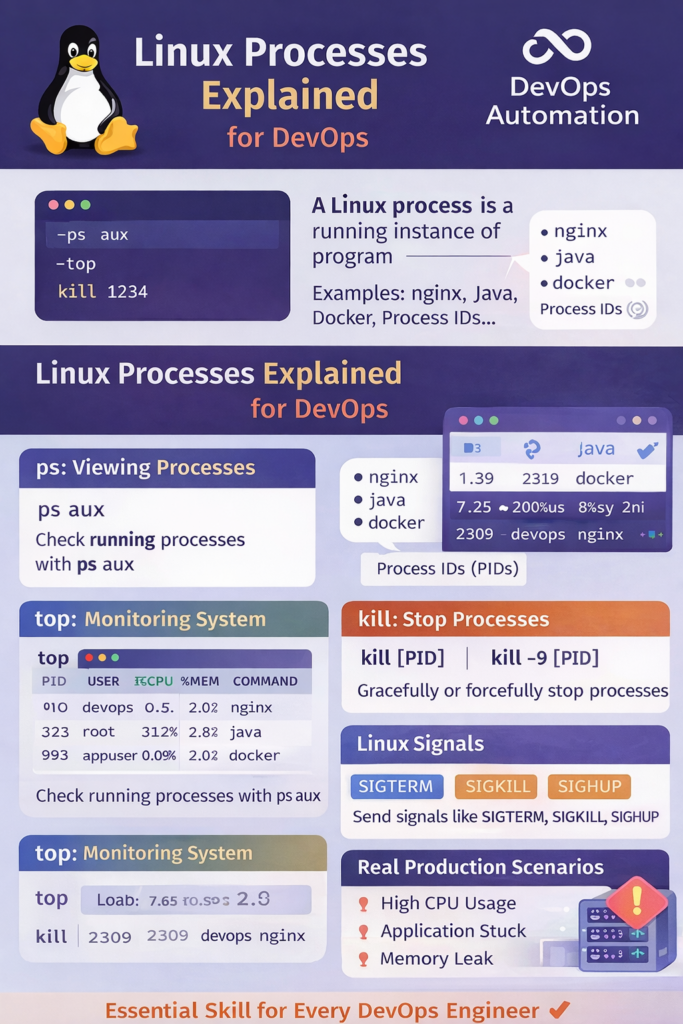
? Linux Processes & Signals for DevOps
Linux processes & signals for DevOps are a core skill every DevOps engineer must master.
In real production environments, applications fail, servers slow down, and resources get exhausted — and when that happens, Linux processes are the first place DevOps engineers look.
Whether you are:
- Debugging high CPU usage
- Investigating memory leaks
- Fixing stuck deployments
- Handling production incidents
Understanding Linux processes for DevOps helps you act fast, stay calm, and restore systems quickly.
This guide explains Linux processes step by step, focusing on real DevOps production scenarios, not just commands.

? What Is a Linux Process?
A Linux process is a running instance of a program.
Examples of processes:
- Web servers (nginx, apache)
- Application services (Java, Node.js, Python)
- CI/CD agents
- Docker containers
In DevOps, every application issue eventually maps back to a process problem.
That’s why Linux processes for DevOps are critical knowledge.
? Why DevOps Engineers Must Understand Processes
In real environments, DevOps engineers use process knowledge to:
- Identify performance bottlenecks
- Stop runaway applications
- Restart failed services
- Diagnose production outages
- Handle on-call incidents
Without process visibility, troubleshooting becomes guesswork.
? ps – Viewing Running Processes
The ps command shows currently running processes.
Common DevOps Usage
ps aux
What this shows:
- CPU usage
- Memory usage
- Process owner
- Command running
Filtering Processes
ps aux | grep nginx
? DevOps use case:
Finding whether a service is running and how much resource it consumes.
? top – Real-Time Process Monitoring
The top command provides a live view of system performance.
top
Key things DevOps engineers watch:
- CPU usage per process
- Memory consumption
- Load average
? Production scenario:
During an outage, top helps quickly identify which process is killing performance.
? kill – Stopping Misbehaving Processes
When processes misbehave, DevOps engineers must stop them safely.
Graceful Stop
kill <PID>
Force Kill (Last Resort)
kill -9 <PID>
?? kill -9 should be used only when graceful shutdown fails.
Understanding signals is essential for Linux processes for DevOps.
? Linux Signals (DevOps Perspective)
Signals tell processes how to stop.
Common signals:
SIGTERM– Graceful shutdown (default)SIGKILL– Immediate terminationSIGHUP– Reload configuration
? Real use case:
Reloading nginx config without downtime using SIGHUP.
? Real Production Scenarios (Very Important)
? Scenario 1: High CPU Alert
Steps:
- Use
topto identify the process - Confirm with
ps aux - Restart service if required
? Scenario 2: Application Stuck After Deployment
Steps:
- Find process ID
- Send
SIGTERM - Use
kill -9only if needed
? Scenario 3: Memory Leak
Steps:
- Monitor memory via
top - Identify process
- Restart application
- Add monitoring for future detection
These scenarios show why Linux processes for DevOps are everyday skills.
? How DevOps Engineers Use Linux Processes in Daily Work
In real-world environments, Linux processes for DevOps are monitored and managed continuously. DevOps engineers rely on process visibility to ensure applications remain stable, responsive, and scalable.
During on-call rotations, engineers often use ps, top, and process signals to quickly assess system health. When alerts trigger due to high CPU usage or memory pressure, identifying the correct Linux process becomes the first step toward resolution.
Mastering Linux processes for DevOps allows engineers to troubleshoot issues without rebooting servers, reduce downtime, and perform safe restarts during production incidents. Over time, process monitoring becomes second nature and strengthens both operational confidence and interview readiness.
These scenarios show why Linux processes for DevOps are everyday skills.
? Common Beginner Mistakes
- Killing the wrong process
- Using
kill -9immediately - Not checking process owner
- Ignoring system load
- Restarting servers instead of fixing root cause
Avoiding these mistakes builds production confidence.
? Why Interviewers Ask About Linux Processes
Interviewers want to see:
- Troubleshooting mindset
- Calm under pressure
- System understanding
Common interview questions:
- How do you find high CPU usage?
- Difference between
psandtop? - When do you use
kill -9?
Strong answers come from real Linux process experience.
? Internal & External Links
Internal Links
External Link
Official Linux documentation
