Linux Disk & File System Management for DevOps (df, du, mount) – Practical Guide
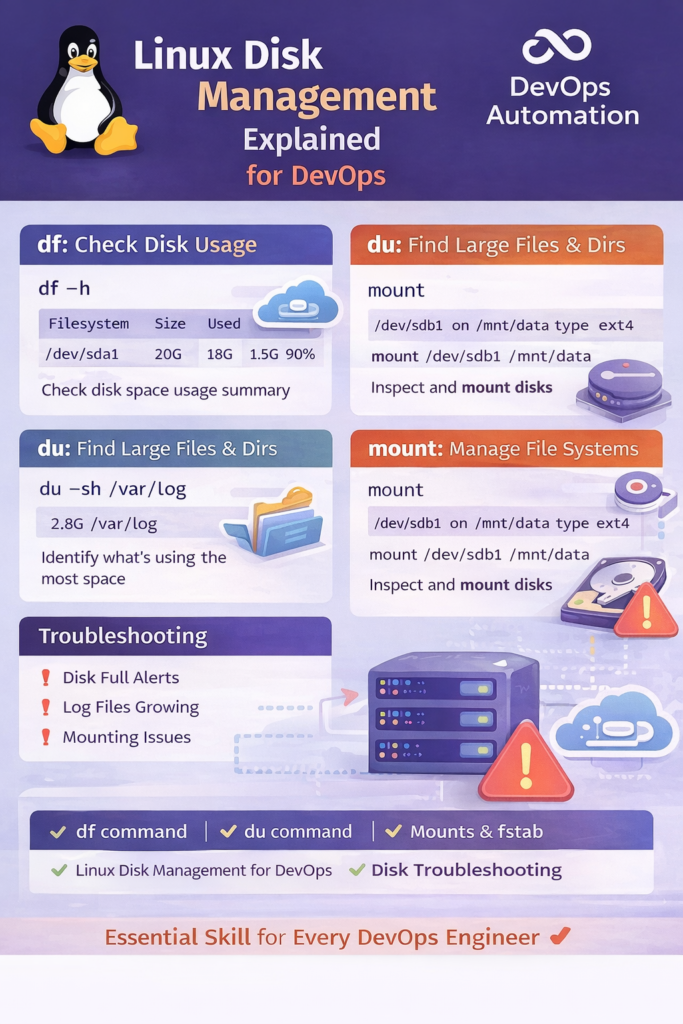
? Linux Disk Management for DevOps – File System & Storage (df, du, mount)
Linux Disk Management for DevOps is a critical skill that directly impacts application stability, performance, and uptime in production environments.
In real-world DevOps scenarios, disk issues are one of the top causes of outages. Applications crash, CI/CD pipelines fail, and servers become unresponsive — often because disk space is full or file systems are mismanaged.
This guide explains Linux disk and file system management for DevOps using practical commands like df, du, and mount, with real production examples.

Why Disk Management Matters in DevOps
In DevOps, disk management is not just a system admin task. DevOps engineers regularly deal with:
- Full root (
/) partitions - Log files consuming disk space
- Docker volumes filling up disks
- CI/CD runners running out of storage
- Kubernetes nodes failing due to disk pressure
Understanding Linux Disk Management for DevOps helps you detect problems early and resolve them without panic.
Key Disk Concepts Every DevOps Engineer Should Know
Before commands, understand these basics:
- File System – Structure used to store files (ext4, xfs)
- Mount Point – Directory where a disk is attached
- Partition – Logical division of a disk
- Disk Usage – Space used vs available
- Inodes – Metadata for files (inode exhaustion is real!)
? df Command – Check Disk Space Usage
The df command shows disk space usage of mounted file systems.
Common Usage
df -h
Output Explanation
- Filesystem – Disk or partition
- Size – Total size
- Used – Space consumed
- Avail – Free space
- Use% – Percentage used
- Mounted on – Mount point
DevOps Use Case
If a production alert says “No space left on device”, df -h is the first command you run.
? du Command – Find What Is Consuming Disk Space
While df shows where, du shows what is consuming space.
Check Directory Size
du -sh /var/log
Find Top Space Consumers
du -ah / | sort -rh | head -20
DevOps Use Case
- Huge logs in
/var/log - Old build artifacts
- Backup directories growing silently
This is extremely common in Linux Disk Management for DevOps tasks.
? mount Command – Understand File System Mounts
The mount command shows how disks are attached to the system.
View Mounted File Systems
mount
Mount a Disk Temporarily
mount /dev/sdb1 /mnt/data
DevOps Use Case
- Attaching new disks for application data
- Mounting volumes for CI/CD runners
- Debugging missing mounts after reboot
Incorrect mounts can break applications even when disk space exists.
Persistent Mounts – /etc/fstab
DevOps engineers must ensure mounts persist after reboot.
View fstab
cat /etc/fstab
Misconfigured fstab entries can cause boot failures, so always test carefully.
Disk Issues in Containers & Kubernetes
In modern DevOps setups:
- Docker uses
/var/lib/docker - Kubernetes nodes use
/var/lib/kubelet - Logs grow rapidly
Common Problems
- Node disk pressure
- Pods evicted due to disk limits
- CI agents filling disks
Linux Disk Management for DevOps directly applies here.
Monitoring Disk Usage (DevOps Best Practice)
In production:
- Monitor disk usage continuously
- Alert before disk reaches 80%
- Track inode usage (
df -i)
Disk monitoring is a must-have for reliable systems.
Common Disk Management Mistakes
? Monitoring only CPU and memory
? Ignoring log growth
? No cleanup automation
? No alerts for disk usage
? Not checking inode exhaustion
Avoiding these mistakes makes you production-ready.
Disk Management in DevOps Interviews
Expect questions like:
- What do you do when disk is full?
- Difference between
dfanddu? - How do you find large files?
- How do you manage disk in containers?
- What happens when inodes are exhausted?
This is why Linux Disk Management for DevOps is frequently tested.
How This Fits into the DevOps Roadmap
This skill connects:
- Linux Fundamentals
- CI/CD Reliability
- Production Support
- Kubernetes Stability
Disk issues are real-world DevOps problems, not theory.
? Internal & External Links
Internal Links
External (DOFOLLOW – add one)
df - report file system disk space usage
