
Phase 3: Git Version Control for DevOps (2026 Guide) – Powerful Hands-On Learning Path
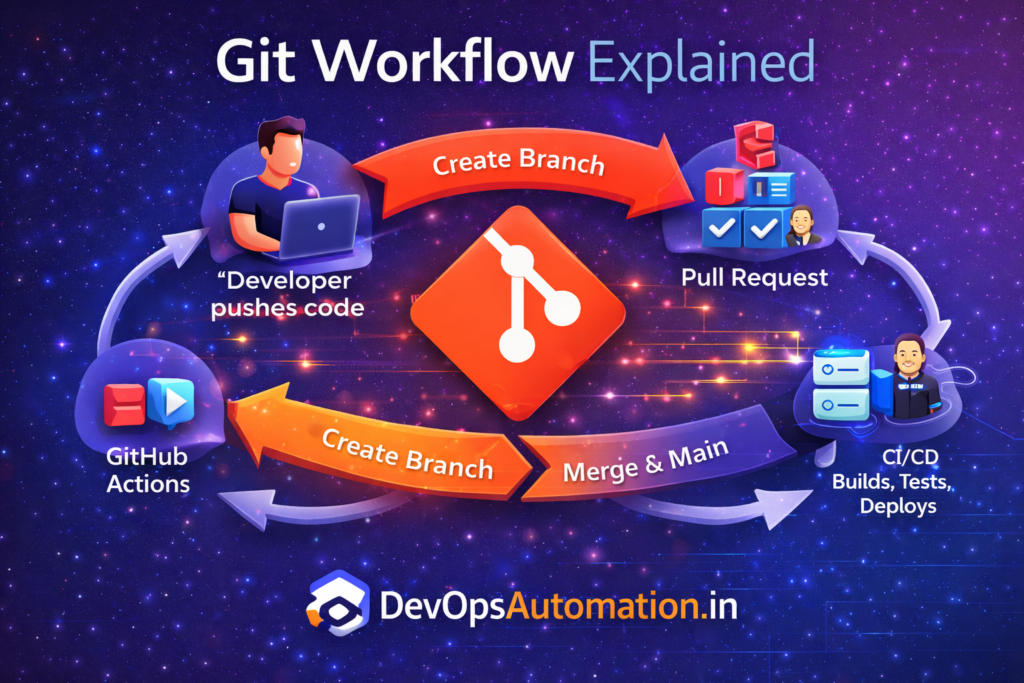
Git Version Control for DevOps is a core skill every DevOps engineer must master. Git is the foundation of modern software development and the starting point of all CI/CD pipelines.
Before automation, cloud, or Kubernetes, DevOps begins with version control. Every deployment, infrastructure change, rollback, and release starts with a Git commit.
In real-world DevOps teams, mastering Git Version Control for DevOps is essential because every pipeline, infrastructure change, and deployment workflow starts from a trusted Git repository.
In real organizations, Git is not just a code storage tool — it becomes the central communication system for engineers, automation pipelines, and audit tracking.

What is Git Version Control for DevOps?
Git is a distributed version control system that helps teams:
- Track code changes
- Collaborate efficiently
- Roll back mistakes
- Maintain code history
- Experiment safely using branches
In DevOps, Git acts as the single source of truth for applications, infrastructure code, pipelines, and configuration files.
Every automation system reads from Git and executes based on changes committed by engineers.
Why Git is Critical for DevOps
Without strong Git Version Control for DevOps practices, teams struggle with automation reliability, audit tracking, and release consistency in production environments.
DevOps teams rely on Git because:
- CI/CD pipelines trigger from Git commits
- Infrastructure as Code is stored in Git
- Collaboration happens via Git workflows
- Code reviews improve quality and security
- Rollbacks become predictable and safe
? No Git = No DevOps automation.
Git Fundamentals Every DevOps Engineer Must Know
? Repository
A repository (repo) stores project files and full history of changes.
? Commit
A commit captures a snapshot of changes along with author, timestamp, and message.
? Branch
Branches allow parallel development without breaking main code.
? Merge
Merging combines changes from branches back into main.
Understanding these concepts prevents accidental overwrites and conflicts.
Essential Git Commands for DevOps
? Understanding Git Internals (In Simple Terms)
Many beginners use Git daily without understanding what happens behind the scenes. While you don’t need to become a Git expert, understanding the basics helps when something breaks.
Git stores everything as snapshots instead of differences. Every commit creates a snapshot of your project state and links it to the previous commit. This allows Git to move backward and forward quickly.
The .git folder contains all metadata, objects, references, and history. When repositories get corrupted or large, knowing this helps troubleshooting.
Understanding Git internals helps you recover repositories, optimize performance, and debug issues in CI systems.
You should be comfortable using:
git clonegit statusgit addgit commitgit pushgit pullgit branchgit merge
? These commands are used daily in real DevOps jobs.
Practical Git Usage Examples
git status
Check which files are modified or staged.
git add .
git commit -m "Add deployment script"
Stage and commit changes.
git pull origin main
Sync latest changes from remote.
These commands become muscle memory over time.
Git Branching Strategies
? Branch Naming Conventions and Clean History
Consistent branch naming keeps teams organized and avoids confusion.
Common patterns:
feature/login-apibugfix/payment-errorhotfix/security-patchrelease/v1.2.0
Clear naming helps automation pipelines trigger correctly and improves traceability.
Maintaining a clean commit history also matters. Avoid committing unrelated changes in one commit. Small focused commits make debugging and rollback easier.
Use descriptive commit messages such as:
Fix database connection timeout in API service
Instead of:
fix bug
Good history becomes a powerful debugging tool.
Branching keeps production stable while allowing experimentation.
Common strategies:
- Feature branching – Each feature in its own branch
- Git Flow – Structured release cycles
- Trunk-based development – Fast continuous delivery
DevOps teams choose strategies based on:
- Team size
- Release frequency
- Automation maturity
- Risk tolerance
A good branching strategy reduces deployment failures.
Pull Requests & Code Reviews
? What Makes a Good Code Review
Code reviews are not just about approving changes. They protect production quality and security.
During reviews, engineers check:
- Code correctness
- Security vulnerabilities
- Performance impact
- Readability and maintainability
- Compliance with standards
Reviewing carefully reduces production incidents and improves team knowledge sharing.
In DevOps environments, reviewers also verify that pipelines, scripts, and infrastructure changes follow best practices.
Pull Requests (PRs):
- Enable collaboration
- Improve code quality
- Reduce production bugs
- Enforce standards
Typical PR workflow:
- Create feature branch
- Commit changes
- Push to remote
- Open pull request
- Review and approve
- Merge to main
? Most CI pipelines run automatically when PRs are created.
Git & CI/CD Integration
?? Handling Merge Conflicts in Real Projects
Merge conflicts happen when two branches modify the same lines of code.
When conflicts occur:
git status
Git highlights conflicting files. Open the file and manually resolve conflicts by choosing correct content.
After fixing:
git add .
git commit -m "Resolve merge conflict"
Never panic during conflicts — they are normal in team environments.
Learning to resolve conflicts confidently is a must-have DevOps skill.
In DevOps automation:
- Code push ? triggers CI
- Pull Request ? runs tests and scans
- Merge ? deploys automatically
- Tag ? creates release
Git becomes the trigger engine for pipelines.
Without Git automation, CI/CD cannot function reliably.
GitHub vs GitLab (High Level)
Popular Git platforms:
- GitHub
- GitLab
- Bitbucket
All platforms provide:
- Code repositories
- CI/CD integration
- Issue tracking
- Collaboration tools
- Access control
? Choose one platform and master it deeply instead of jumping between tools.
Real-World DevOps Git Workflow
A typical workflow looks like this:
- Developer pushes code to Git
- CI pipeline builds and tests
- Security scans execute
- Artifacts are generated
- Deployment triggers automatically
- Monitoring validates health
Every step starts from Git commits.
? Example – Handling a Failed Deployment Using Git
If a deployment fails in production:
- Identify last working commit
- Roll back using Git history
- Redeploy stable version
- Investigate faulty change
- Fix in a new branch
Git history provides safety and traceability during incidents.
?? Git Security Best Practices for DevOps Teams
In production environments, Git repositories often contain sensitive information such as configuration files, deployment scripts, infrastructure templates, and sometimes secrets. Protecting repositories is a critical DevOps responsibility.
Always avoid committing secrets like API keys, passwords, and tokens. Instead, use environment variables or secret management tools such as Vault or cloud secret managers. If a secret is accidentally pushed, rotate it immediately and remove it from history.
Enable branch protection rules on main branches. This prevents accidental direct pushes and enforces pull request reviews before code merges. Most production incidents happen when changes bypass reviews.
Use signed commits when possible to verify author identity and prevent tampering. Limit repository access using least privilege principles and review permissions regularly.
Security in Git is not optional — it is part of production reliability.
? Managing Large Repositories and Performance Issues
As projects grow, repositories can become large and slow. This impacts cloning speed, CI execution time, and developer productivity.
To keep repositories healthy:
- Remove unused files and binaries from version history
- Avoid committing generated artifacts and build outputs
- Use
.gitignorecorrectly - Archive old branches regularly
For very large assets such as media or binaries, consider using Git LFS (Large File Storage) instead of normal commits.
Keeping repositories clean improves pipeline performance and reduces storage costs.
Common Beginner Mistakes
Avoid these: