Docker Architecture Explained: Images, Containers, and Engine (Beginner Guide)
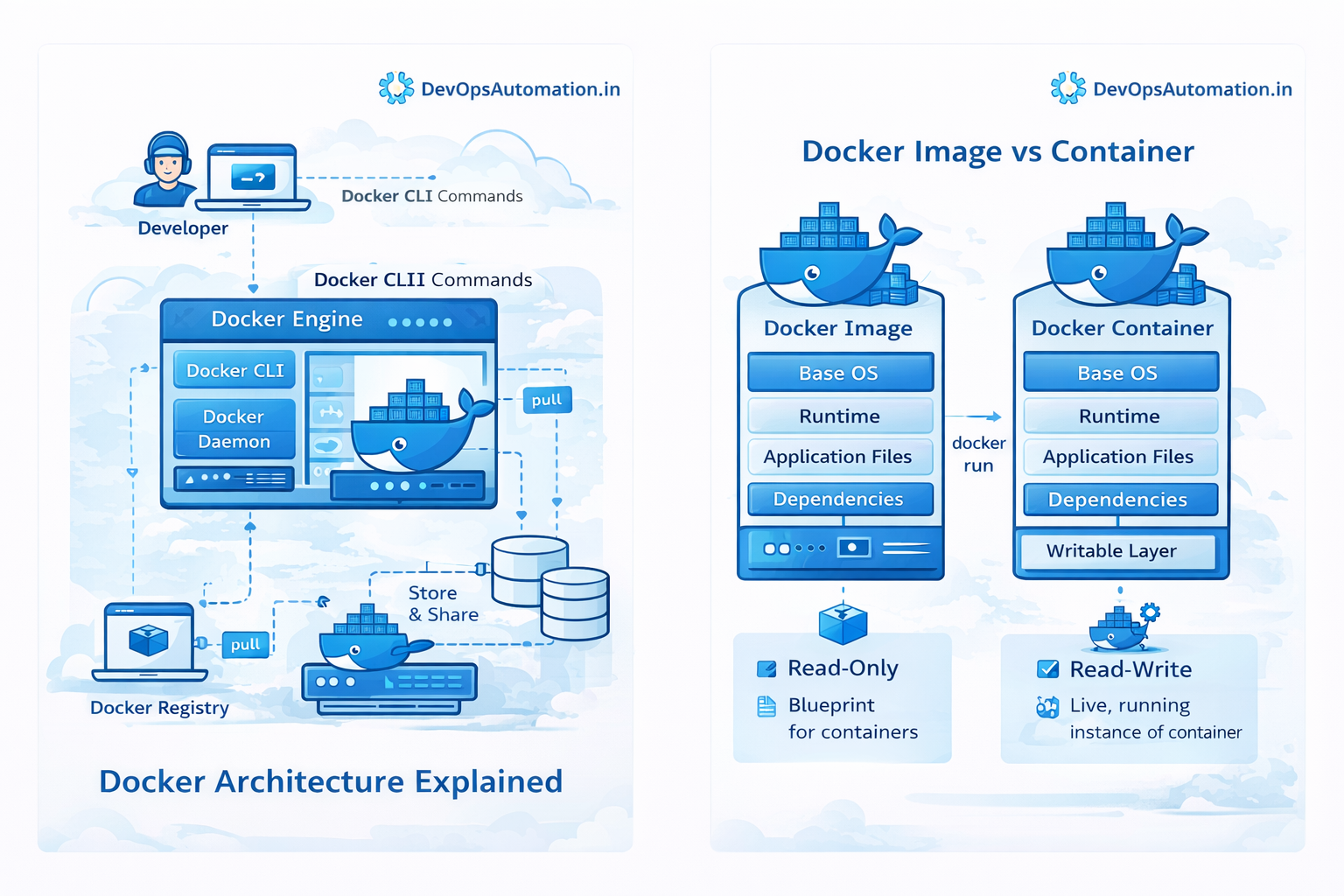
? Docker Architecture – Complete Guide
Introduction
Modern software development relies heavily on containers, and Docker has become the most popular platform for containerization. But to truly understand how Docker works, every DevOps engineer must learn about Docker architecture.
Many beginners know how to run Docker commands like docker run or docker build, but they often do not understand what happens behind the scenes. Understanding Docker architecture helps DevOps engineers design scalable infrastructure, troubleshoot container issues, and build reliable CI/CD pipelines.
Docker uses a client-server architecture that allows developers to build, ship, and run applications inside containers efficiently.
What you will learn
- What Docker architecture is
- Components of Docker architecture
- Docker Client, Docker Engine, and Docker Registry
- Difference between Docker images and containers
- How Docker works internally
- Real DevOps use cases
- Best practices for container environments
By the end of this guide, you will clearly understand how Docker architecture works in real-world DevOps environments.
? Overview of Docker Architecture
Docker uses a client-server model where different components communicate with each other to run containers.
Main Components:
- Docker Client
- Docker Host
- Docker Engine
- Docker Images
- Docker Containers
- Docker Registry
Workflow:
Developer → Docker Client → Docker Engine → Docker Container
When a developer runs a Docker command, the Docker Client sends instructions to the Docker Daemon, which builds or runs containers.
?? Docker Client
The Docker Client is the main interface used to interact with Docker.
Common commands:
- docker build
- docker run
- docker pull
- docker push
- docker ps
- docker stop
Example:
docker run nginx
Client sends request to Docker Daemon.
Communication methods:
- Unix sockets
- REST APIs
- TCP connections
? Docker Host
Docker Host is the machine where containers run.
Types:
- Laptop
- Cloud VM
- Physical server
- Kubernetes node
Inside Docker Host:
- Docker Engine
- Images
- Containers
- Networking
- Storage volumes
? Docker Engine
Docker Engine is the core component of Docker architecture.
Responsibilities:
- Build images
- Run containers
- Manage networking
- Manage storage
- Handle lifecycle
Docker Daemon
Runs in background and manages Docker objects.
Example:
docker run ubuntu
Steps:
- Pull image
- Create container
- Start container
Docker REST API
Used by tools like:
- Kubernetes
- Jenkins
- GitLab CI
- Terraform
Helps in automation and CI/CD pipelines.
Docker CLI
Command-line interface to interact with Docker.
Commands:
- docker images
- docker ps
- docker logs
- docker stop
- docker rm
? Docker Images
A Docker image is a read-only template used to create containers.
Contains:
- Application code
- Runtime
- Libraries
- Dependencies
- Configuration
Example Dockerfile:
FROM node:18
WORKDIR /app
COPY package.json .
RUN npm install
COPY . .
CMD ["node", "app.js"]
? Docker Containers
A Docker container is a running instance of an image.
Features:
- Lightweight
- Fast startup
- Isolated
- Uses shared OS kernel
Example:
docker run nginx
? Docker Registry
Docker Registry stores images.
Examples:
- Docker Hub
- AWS ECR
- Google Container Registry
- Azure Container Registry
- GitHub Container Registry
Workflow:
Build → Push → Pull → Run
Command:
docker push myapp:v1
? Docker Workflow
Step 1: Create Dockerfile
Step 2: Build Image
docker build -t myapp .
Step 3: Store locally
Step 4: Push to registry
docker push myapp
Step 5: Deploy container
Step 6: Run application
? Real DevOps Use Cases
CI/CD Pipelines
Code → Build → Test → Deploy
Microservices
- Frontend
- Backend
- Database
- Cache
Kubernetes
Docker → Container → Pod → Cluster
Development Environments
Same environment in dev and production.
? Docker vs Virtual Machines
| Feature | Docker | VM |
|---|---|---|
| Startup | Seconds | Minutes |
| Resource | Lightweight | Heavy |
| OS | Shared Kernel | Full OS |
| Performance | High | Medium |
| Portability | Very High | Low |
? Security in Docker
Best Practices:
- Use trusted images
- Scan vulnerabilities
- Avoid root user
- Limit permissions
- Update dependencies
Tools:
- Trivy
- Clair
- Docker Bench
? Benefits of Docker
- Fast deployment
- Lightweight
- Portable
- Scalable
- Consistent environments
- Easy CI/CD integration
? Final Note
Docker architecture is the foundation of modern DevOps systems. Understanding it helps in building scalable, secure, and efficient applications.
